
Installation
endpoint, key, registry.
From the unzipped folder to a console that reads the chain through your own endpoint. Plan about 20 minutes.
01Build
- Install packages
flutter pub get - Check it
flutter analyze # expect: No issues found flutter test # expect: All tests passed - Run the console
flutter run -d macos    # desktop; see the note below first
flutter run -d chrome   # or in the browser
The shipped macOS app is sandboxed without the com.apple.security.network.client entitlement, so macOS blocks its requests to your RPC endpoint. Add it before you use the desktop app (how). Found by reading macos/Runner/*.entitlements; the desktop app was not run for these docs.
02Your RPC endpoint
Required before a real round
- Get an endpointFrom any Solana RPC provider, on your own account.
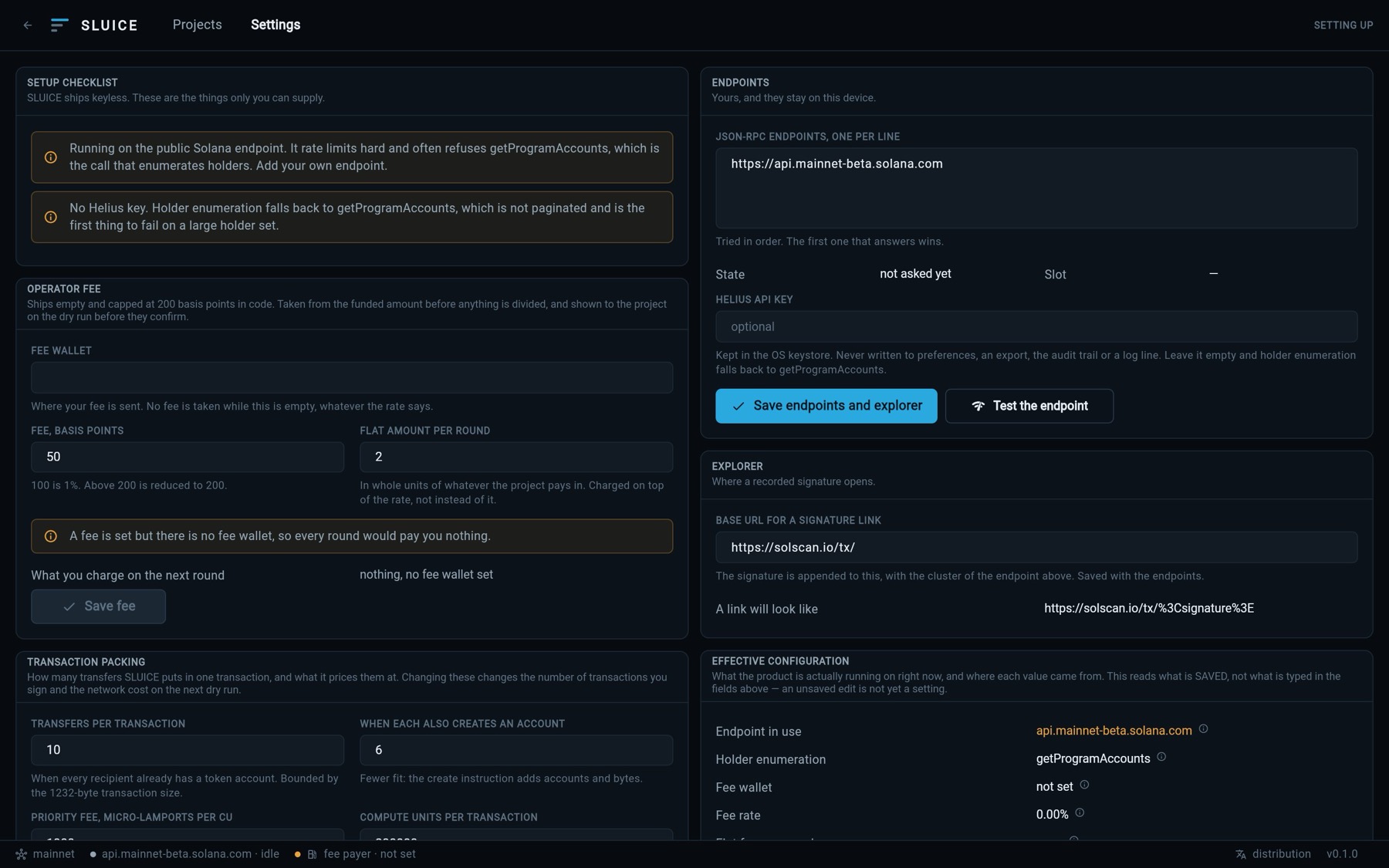
- Open Settings → EndpointsOn first run, Endpoints and keys takes you there.
- Paste your URLsIn JSON-RPC endpoints, one per line. They are tried in order and rotated on failure.
- Save and testSave endpoints and explorer, then Test the endpoint. The state and current slot appear.
The endpoint list is saved in the app's local preferences with the other operator settings (lib/core/config/operator_config.dart); only the Helius key goes to the OS keystore. If your provider puts a key inside the URL, restrict that key in the provider's dashboard, and prefer the separate Helius key field for Helius.
03Your Helius key
Recommended Settings → Endpoints → Helius API key. The key is written to the OS keystore (Keychain on macOS and iOS, Keystore on Android) under sluice.vault.helius_api_key. It is never written to preferences, an export, the audit trail or a log line; the rest of the app only sees whether one is present. Remove the stored key deletes it.
Helius does not allow sharing a key, so SLUICE ships none.
04Verify the program registry
Exclusions → Verify the registry on chain. SLUICE ships a list of AMM, bonding-curve and order-book programs, each marked unverified. This calls getAccountInfo on each ID and marks those that exist and are executable. An ID that does not verify is struck through and no longer used as a label.
Detection does not depend on it: a pool vault is caught first because its authority is off the ed25519 curve, which needs no list.
05Your claim program (Merkle path only)
SLUICE prepares the Merkle root and proofs. The on-chain program that verifies a claim, holds the funded account and enforces the deadline is yours. Put its program ID in the project's Claim program id field. Until you do, a Merkle round reports "not ready". Your program must use exactly this encoding:
leaf = sha256( 0x00 || index_u64_le || owner_32 || amount_u64_le )
node = sha256( 0x01 || min(left,right) || max(left,right) )
An odd node is promoted unchanged, never duplicated. The encoding is restated in every exported proof bundle. The direct-transfer path needs no program.
06Where your data lives
On the machine SLUICE runs on. Settings, projects and the audit trail are in the app's local preferences; credentials are in the OS keystore (browser storage on web). Nothing is uploaded. Back up each round by exporting its Proof bundle: a round can be reproduced from its snapshot, so the bundle is the durable record.
07Checklist
- Test the endpoint answers with a slot.
- The setup checklist in Settings has no warning left, or you know why.
- The registry is verified.
- For Merkle rounds: your claim program ID is set in each project.